How To Add A Printer To A Mac

How to add a printer to a mac

Knowing how to add a printer to a Mac will ensure that your printer is connected correctly and efficiently. Well, it is an easy process that can be completed in just a few simple steps. Depending on the type of printer you have, you may need to connect it to your Mac via a USB cable, or you may be able to connect wirelessly. Once you have your printer connected to your Mac, you will need to install the printer’s driver, which allows your Mac to communicate with the printer. After that, you can add the printer to your Mac and start using it.

Brother is a popular brand in the world of printers. It offers excellent quality, durability, as well as reliability. Read our blog on the advantages of buying Brother printers.

How to add a printer to a mac?

Via USB cable

  • Connect the printer to your Mac computer via the USB cable.
  • Make sure the printer is powered on and also the USB cable is securely connected.
  • Tap on the Apple icon in the upper left corner of the screen, then select System Preferences.
  • Click Printer & Scanners.
  • Click the plus (+) icon to add a printer.
  • Select your printer in the list of available printers like the Epson wireless printer and follow the onscreen instructions to complete the setup.

Via WPS

  • Press and hold the WPS button on your router for 3 seconds.
  • On your Mac, open System Preferences and click Printers & Scanners.
  • Click the plus (+) icon to add a printer.
  • Select your printer in the list of available printers as well ad follow the onscreen instructions to complete the setup.

Via IP Address

  • Connect the printer to your Mac computer via an Ethernet cable.
  • Make sure the printer is powered on and the Ethernet cable is securely connected.
  • Click the Apple icon in the upper left corner of the screen, then select System Preferences.
  • Tap on Printer & Scanners.
  • Click the plus (+) icon to add a printer.
  • Select your printer from the list of available printers and also follow the onscreen instructions to complete the setup.

Getting a printer for your iPhone also makes your life convenient. You can print documents, assignments, photos, as well as many more things if you have a printer. Read our blog on the best printers for iPhone to know more.

Bluetooth printer to Mac

  • Check the system requirements: Before adding a Bluetooth printer to your Mac, make sure that your Mac supports Bluetooth.
  • Activate Bluetooth on your Mac: Go to the Apple menu and select System Preferences. Select Bluetooth and make sure that the Bluetooth is turned on.
  • Turn on your printer: Turn on your printer and also make sure that it is in discovery mode. This allows the printer to be discovered by your Mac.
  • Add the printer: Go back to the System Preferences and select Printers & Scanners. Click the + button to add a printer. Your Mac will search for available printers.
  • Select the printer: Select your printer from the list of available printers. When prompted, enter the passcode (if applicable) for the printer.
  • Print a test page: Once the printer is added, try printing a test page to make sure that the printer is working correctly.
  • Enjoy printing: Your Bluetooth printer is now ready to use with your Mac. Enjoy printing!

HP Designjet T120 Inkjet is also a great model that supports wireless connectivity that helps connect smartphones or tablets to print from anywhere.

How to add an Epson printer to mac?

  • First, make sure the Epson printer like the Epson inkjet printer is turned on and all the cables are connected.
  • Open the System Preferences and select the Print & Scan option.
  • Click on the + sign to add a new printer.
  • Select your Epson printer from the list of available printers.
  • Click on the Add button to add the printer to the list of available printers.
  • If prompted, enter the name of the Epson printer and click Add.
  • Select the printer from the list and click the Use or Print Using menu.
  • Select the driver for your Epson printer from the list of available drivers.
  • Click the Add button to add the printer to the list of available printers.
  • The Epson printer is now added to your Mac and you can use it to print documents.

The customer reviews of Epson EcoTank ET-2720 claim that it’s compatible with Alexa and Google Assistant which makes it easy to operate by voice commands.

Why is my Mac not finding my wireless Printer?

There are several reasons your Mac might not be finding your wireless printer like Canon wireless printer. First, you should make sure that your printing device is connected to the same Wi-Fi network that your Mac is connected to. If you are using a dual-band router, make sure your printer is connected to the same frequency as your Mac. You should also make sure that your printer is turned on and that the Wi-Fi connection is enabled.

You should also try restarting both the printer as well as your Mac if your printer is connected to the same network as your Mac but still not visible. If that doesn’t help, you should check that your printer’s firewall isn’t blocking the connection. If it is, you can either disable the firewall or add your Mac’s IP address to the whitelist.

Finally, if you’re still having trouble, you should try connecting your Mac directly to the printer via a USB cable. This will allow you to install any necessary drivers if needed. Once the drivers are installed, you can also try setting up the wireless connection again.

HP all-in-one laser printer’s reviews show that it keeps your office connected with built-in wireless capabilities, and also lets you print from your smartphone or tablet without a network using Wi-Fi Direct

Why can’t I add a printer to my mac?

There are several reasons why you may not be able to add a printing device to your Mac.

  • Printer compatibility: The printer you are attempting to add may not be compatible with your Mac. To ensure compatibility, check the printer’s website for a list of supported operating systems.
  • Drivers: You may need to install the printer’s drivers before you can add a printer like Kyocera printer to your Mac. Check the printer’s website to see if there are any drivers available for your Mac.
  • Network connection: The printer must be connected to the same network as your Mac. If the printer is not connected to the same network, you will not be able to add it.
  • Software: You may need to install specific software in order to add the printer to your Mac. Check the printer’s website to see if there are any software packages available for your Mac.

Printers have become a necessary device for students when it comes to completing assignments as well as tasks. Go through our blog on the best printers for students to know more.

Conclusion

Adding a printer to a Mac is a straightforward and simple process. With the help of the printer setup utility, you can easily configure the printer, choose the correct protocol, and select the correct driver. Once the device is connected, you can also print documents from your Mac. Also, if you are having trouble connecting the printer, you can use the Wi-Fi setup feature to connect the printer wirelessly. With a few simple steps, you can easily add a printer to your Mac.

BestViewsReviews helps you find the best inkjet printers on the market by rating as well as reviewing them on the basis of quality, convenience, and durability. Get unbiased, honest reviews of products before you buy.

Are 2-in-1 Laptops Worth Buying?

2 in 1 Laptops

The primary advantage of purchasing 2 in 1 laptop is the cost savings that result from not having invested further in a conventional laptop. However, a convertible notebook is not a good choice if you are not a fan of utilizing tablets and believe you will need more time to use them in the future. 

A 2-in-1 laptop can be used as a desktop computer and a tablet which makes it an extremely desirable consumer technology. It offers portability and access to tasks you simply couldn’t achieve with a traditional top-quality laptop. It is a hybrid device that combines a laptop and a tablet into a single device.

Are you thinking of purchasing the best laptop that doubles as a tablet? First, let’s examine their advantages and the plethora of functions featured in these multipurpose devices. 

What is a 2-in-1 laptop? 

The primary capabilities of a conventional grapple laptop and a tablet are combined in a 2-in-1 laptop. In addition, it creates a large category of different types of devices. For example, there are machines that have characteristics similar to those of tablets that can also function as laptops and devices with high computing power that can also function as tablets. However, the 2-in-1 laptop needs to include some important components: 

  • Keyboard with a touchscreen
  • Full-fledged operating systems, such as Google Chrome OS or Microsoft Windows
  • Superior processing capacity compared to a regular tablet 

It is also common to be confused about what to buy between touch screen laptops vs non-touch laptops. Well, both laptops are good to have and you should weigh their advantages and disadvantages before buying one.

Types Of 2 in 1 Laptop

There are three primary classes of 2-in-1 laptops to choose from. There is also a model called the Netvertible, in addition to the 2-in-1 convertible and the 2-in-1 detachable. Continue reading for a straightforward explanation of 2-in-1 laptops: 

1. 2 in 1 Convertible

Tablets referred to as “2 in 1 convertible,” can fold, spin, or even slide out a keyboard from underneath their bodies. The hinge for these devices is at the intersection of the keyboard and the display. 

2. Netvertible  

The hinge is present in a Netvertible, and the central hinge can rotate on an axis that is perpendicular to the keyboard. In addition, these gadgets can support a touch screen or an active stylus as input methods. 

3. 2 in 1 Detachable 

The keyboards of devices referred to as “2 in 1 detachable” can be removed. The keyboard section of these devices typically contains a few additional functionalities in addition to their standard functionality.

However, docking stations are one of the more common features. The keyboard attaches and the display becomes detachable and requires support or can stand independently.

In most cases, you can purchase a package deal including the display and the keyboard; however, certain brands require you to buy the keyboard and display separately. 

Are 2-in-1 laptops worth buying? 

Depending on what you plan to do with your laptop, a 2-in-1 model may be the most suitable option. If you require a portable machine with a display that can be touched and features that allow it to be converted, you can’t go wrong with a 2-in-1 laptop. These hybrid laptops are capable of performing almost anything, from working in an office to streaming media, and they also provide an unbelievable degree of portability and versatility. 

Additionally, two-in-one laptops have the potential to be a worthwhile purchase for a large number of people, including students and remote employees, who want to use their computers for enjoyment outside of work hours.  

Almost all 2-in-1 models can use the windows operating system (OS) in tablet mode. This makes it a more feature-rich option for people who enjoy the tablet experience but are frustrated by the limited features available. 

On the other hand, if you require more processing power for activities such as gaming or video editing, there might be better options than a 2-in-1 laptop. 

Reasons why you should buy a 2-in-1 laptop 

There are several advantages to a laptop that can switch between tablet and laptop use. They provide an excellent deal for the money and a longer battery life. The top 5 reasons you should acquire a laptop that combines two functions. 

  • Portability for work or school 
  • Longer battery life 
  • More modes for ultimate flexibility 
  • Excellent value
  • Touch screen for enhanced use

Final Verdict

Laptops with a 2-in-1 design can switch between a tablet and a traditional laptop. In addition, they include a screen that you can detach from the keyboard and use independently, giving the device the functionality of a tablet when detached.

BestViewsReviews helps you find the best tablets and gaming laptops on the market by rating and reviewing them on the basis of quality, convenience, and durability. Get unbiased, honest reviews of products before you buy.
How To Cook Pork Chops In Air Fryer

Pork chops in air fryer

Cooking pork chops in an air fryer is a terrific way to enjoy a delicious and flavorful meal without the hassle of deep-frying. Pork chops are a delicious and hearty meal that can be prepared in a variety of ways. One of the quickest and healthiest methods to prepare them is in an air fryer. Air fryers use hot air to cook food and require little to no oil, resulting in a delicious and lower-fat meal.

You can also use Air fryers to make amazing recipes like pizza rolls. If you want to try cooking them on your own, go through our blog on how to cook pizza rolls in air fryer.

Pork chops in an air fryer: The step by step Recipe

  • Preheat the air fryer to 350°F.
  • Place pork chops in a shallow dish and season with olive oil, garlic powder, onion powder, salt, and pepper.
  • Place pork chops in the air fryer.
  • Cook for 8 minutes.
  • Flip pork chops over and cook for an additional 5 minutes.
  • Check to make sure pork chops have reached an internal temperature of 145°F.
  • Serve pork chops immediately.

For perfectly cooked pork chops, you will need the right air fryer model that has got good customer reviews. Well, you can opt for the Ninja foodi 9-in-1 air fryer which has got positive reviews for its 9-in-1 versatility. This model offers pressure cooking, slow cook, steaming, and more.

What ingredients do you need?

The ingredients you need to make pork chops are as follows:

  • 4 boneless pork chops
  • 1 tablespoon olive oil
  • 1 teaspoon garlic powder
  • Salt and pepper, to taste
  • 1 teaspoon onion powder

Air fryer sweet potatoes are also a great snack to try. Not just pork chops, you can also use your air fryers to cook sweet potatoes. Make sure you know how to make air fryer sweet potato fries so that you end up making a delicious meal.

FAQs

How long do you cook pork chops in the air fryer?

Cooking time for pork chops in an air fryer like COSORI Air Fryer will vary depending on the thickness of the chops, the temperature of the air fryer, and any additional ingredients or seasonings. Generally, for boneless pork chops that are 1 inch thick and cooked in a 350°F air fryer, cook for 8-10 minutes, flipping halfway through. For bone-in pork chops that are 1 inch thick, cook for 10-12 minutes, flipping halfway through. For thicker chops, add an additional 2-4 minutes to the cooking time.

At what temperature should you cook pork in an air fryer?

The ideal temperature is 350°F when cooking pork in an air fryer like Gourmia 7-quart digital air fryer. This temperature will ensure that the pork is cooked through while still retaining its juicy texture and flavor. It is important to note that the cooking time will depend on the size and thickness of the pork. For example, a thick pork chop may take up to 12 minutes to cook, while a thin pork chop may only take 8 minutes. If you are unsure of the exact cooking time, use a thermometer to determine the internal temperature of the pork. The pork is safe to eat when it reaches an internal temperature of 145°F.

The Ninja max xl air fryer can be a great buying option. With 450 degrees of superheated air, it cooks foods up to 30% faster, leaving them hotter, crispier, and fat-free.

What is the best method to cook pork chops?

The best method to cook pork chops is to pan-fry them. Pan frying is a quick and easy way to cook pork chops that will give you great results.

  • The first step is to season the pork chops with salt and pepper. You can also add other spices and herbs like garlic powder, paprika, and thyme for extra flavor.
  • Next, heat a large skillet over medium-high heat and add a tablespoon of oil. Once the oil is hot, add the pork chops and cook for 3-4 minutes per side, or until they are golden brown and cooked through.
  • Finally, reduce the heat to low and continue to cook the pork chops for another 5-7 minutes, or until they reach an internal temperature of 145°F.
  • Once the pork chops are cooked, transfer them to a plate and let them rest for a few minutes before serving. This will help the pork chops retain their juices and stay tender and juicy.

Choosing between an air fryer and a grill can be a confusing decision. Both these kitchen appliances have their own pros and cons. Read our blog on air fryers vs grills to know which is better for your kitchen.

Conclusion

Preparing pork chops in an air fryer is a fantastic way to get a delicious and healthy meal that is ready in no time. It is simple to do, requiring only a few ingredients and minimal preparation. To cook pork chops in an air fryer, season the pork chops with your favorite spices, place them in the air fryer basket, and set the temperature and timer according to the recipe instructions. Air fryers cook pork chops quickly and evenly, ensuring juicy and tender results every time. With a little bit of preparation, you can enjoy delicious pork chops in no time!

Get the best reviews and ratings on the products you’re interested in. BestViewsReviews helps you make the right purchasing decision. Whether you’re looking for the top-rated toaster ovens or the best air fryers, we’ve got you covered.

Top 5 Gaming PC Under $1000

gaming pc under $1000

A gaming PC under $1000 is a fantastic option for gamers who are looking for a powerful machine. A gaming PC in this price range typically comes with a powerful processor like Intel® Core™ i7 processor or AMD Ryzen™ 5000 Series, RAM of 8 to 16 GB and SSD storage of 256 GB or even more, and a dedicated graphics card. This combination of hardware makes it suitable for playing the latest games at decent frame rates and resolutions.

Top 5 Gaming PC under $1000

HP Elite Desktop PC Computer

HP Elite Desktop PC Computer’s reviews claim that it is refurbished, fully functional, and in excellent condition. This model has been professionally inspected, tested, and cleaned by Amazon-qualified vendors. It has a battery that exceeds 80% capacity relative to the new. The screen and body show no signs of cosmetic damage visible from 12 inches away.

HP Pavilion Gaming Desktop

HP Pavilion Gaming Desktop keeps up with you and the games of tomorrow thanks to its powerful intervals, support for a second display, customizable LED lighting, seamless expansion, and easy upgrades. It has been designed to last with 230 quality tests to its name. This model easily connects to a second display, external storage drives, and all your accessories.

SkyTech Blaze II Gaming Computer

The customer reviews of SkyTech Blaze II Gaming Computer show that it offers built-in 8 GB RAM ensures fast operation. This model comes with a free RGB keyboard and mouse that makes it easy to use. Its 3 x RGB RING fans offer maximum airflow that keeps the device cool.

HP RGB Gaming Desktop PC

HP RGB Gaming Desktop PC comes with a RAM memory of 16 GB. It has been professionally inspected, tested, and cleaned by Amazon-qualified vendors. The screen and body of this model show no signs of cosmetic damage visible from 12 inches away. It also has a battery that exceeds 80% capacity relative to the new.

Acer Aspire TC-1760-UA92 Desktop

Acer Aspire TC-1760-UA92 Desktop comes with an easily expandable 12th Gen Intel Core i5 processor. It has the speed, power, and storage to do more—every day. It also comes with a USB keyboard and mouse included. This model also features 2×2 MU-MIMO technology. It can perform all the tasks from basic computing to multimedia entertainment.

Components in a gaming PC

Processor: AMD or Intel

The processor is one of the most important components of a gaming PC. It’s responsible for running all of the software, games, and other applications. When it comes to choosing a processor, there are two main choices: AMD or Intel. AMD processors typically provide better value for money, while Intel processors tend to offer higher performance.

RAM

RAM (Random Access Memory) is a type of computer memory used to store programs and data while the computer is running. The more RAM your PC has, the more quickly it can process information. Generally, 8GB or more of RAM is recommended for gaming.

Graphics

Graphics are responsible for displaying the images and visuals on the computer screen. Dedicated graphics cards are the best choice for a gaming PC as they provide superior performance. Nvidia and AMD are the two most popular brands of dedicated graphics cards.

Storage

Storage is responsible for storing all the data and programs that are installed on the computer. Most gaming PCs like ZOTAC Gaming MEK Hero have an SSD (Solid State Drive) and an HDD (Hard Disk Drive). An SSD is faster and more reliable than an HDD, but it’s also more expensive.

Power supply

The power supply is responsible for supplying power to all the components in the computer. It’s important to choose a power supply that is powerful enough to power all the components in the computer.

The PC case is also an important component for building a computer. Go through our blog on everything you need to know about a PC case to learn more.

Peripherals you need to add

Gaming Keyboard

A gaming keyboard is an essential peripheral for a gaming PC. It provides greater precision and control when gaming, and often features specialized programmable keys and extra macro buttons. The keys are often designed to be comfortable and responsive, making them ideal for gaming.

We have reviewed some of the best-selling gaming keyboards based on their performance and quality.

Gaming Mouse

A gaming mouse is a must-have for serious gamers. It provides greater precision and accuracy when gaming, as well as customizable buttons, adjustable sensitivities, and a higher polling rate than regular mice.

Gaming Headset

A gaming headset is a great way to immerse yourself in your game and communicate with other players. A good gaming headset will have noise-canceling features, adjustable volume control, and comfortable padding. Many headsets also come with a microphone, so you can chat with other players.

We also have a detailed blog on the best gaming headsets. Reading this blog will help you choose the right gaming headset for yourself.

FAQs

Is 8 GB RAM good for gaming?

Yes, 8 GB RAM is good for gaming. It’s enough to play most modern games without lag or stuttering. A 16 GB of RAM may, however, be a better choice if you’re looking to play games with higher graphics settings or play more memory-intensive games.

Is $900 good for a gaming PC?

It depends on what type of gaming PC you are looking for. If you are looking for a basic gaming PC that can handle basic games but won’t give you the best performance, then yes, $900 is a good budget. You will likely be able to get a decent processor, some RAM, a decent graphics card, and a good case.

On the other hand, if you are looking for a high-end gaming PC that can play the latest games on ultra settings, then a gaming pc under $1000 or $900 is not enough. You may be able to get some good components, but you will likely not be able to get all the components you need for a high-end gaming PC. You would need to spend closer to $1500 or more for a PC that can handle the latest games on ultra settings.

Conclusion

All in all, a gaming PC under $1000 is an excellent choice for those looking to get into gaming without spending too much. It offers great performance for the price, with a decent range of hardware and features. It is also capable of running most modern titles at respectable settings, while its expandability options give it room to grow.

Get the best reviews and ratings on the products you’re interested in. BestViewsReviews helps you make the right purchasing decision. Whether you’re looking for the top-rated gaming tower computers or the best gaming mice, we’ve got you covered.

Why Is Everyone Calling Razer ‘Razor’?

Razor

Have you ever noticed the confusion between the spelling of the brand Razer? Most people often pronounce it as Razor. From gaming laptops to headphones, razer has a lot of products but why is everyone calling Razer ‘Razor’?

Razer is famous for its sleek, modern designs and high-performance gaming gear. Its name Razer is often mistaken for the word “Razor”. This confusion is likely due to the similarity in both names and the fact that Razer is a relatively new company in the gaming market. While the two words sound similar, the spelling is different. Despite the mix-up, Razer is gaining popularity as a gaming brand and continues to expand its product line to meet the needs of gamers around the world.

Is it spelled as ‘Razor’ or ‘Razer’?

Razer is a brand of gaming hardware, such as gaming laptops, gaming keyboards, and gaming mouse. It is also the name of a line of gaming accessories, such as headsets and gaming controllers. The correct spelling of the brand is “Razer,” not “Razor.” It was founded in 2005 and has become a leading brand in the gaming industry. It offers high-quality gaming gear for competitive and casual gamers alike.

Why The Name Razer?

The name Razer was chosen to represent the company’s ethos of being razor-sharp and edgy. It also reflects the company’s mission of helping gamers achieve the highest level of performance. Therefore, the name Razer symbolizes a company that is providing gamers with the best gaming experience possible.

Who is RazerGuy?

RazerGuy is an online gaming channel handled by an anonymous person. The handle is about gaming hardware and accessories of the company Razer. RazerGuy is also participating in gaming forums. It provides helpful advice to gamers who are looking for tips, tricks, or advice on gaming hardware and software. It also provides you the Razer product reviews and feedback. Despite the anonymity of RazerGuy, it has become a well-known figure in the gaming community that offers valuable insight.

What is the Razer Series?

The Razer Series includes gaming laptops, keyboards, and mouse, as well as other gaming accessories such as headsets, mouse mats, and controllers. All Razer series products give gamers a competitive edge in gaming by providing superior performance, reliability, and comfort. With the Razer Series, gamers can take their gaming experience to the next level.

Some Razer Laptops

Razer Blade 15 Gaming Laptop

You can opt Razer Blade 15 Gaming Laptop that has a 15.6″ full HD display for an immersive experience. This model has a CNC aluminum unibody house that provides you incredible performance. It has 16GB dual-channel memory as well as fast 256GB SSD storage, which allows you to store more.

Razer Blade 15 Base Gaming Laptop

The Razer Blade 15 Base Gaming Laptop comes with a 4K OLED display that delivers fast response time and a wide color range. The 10th Gen Intel Core i7-10750H processor provides the ultimate level of performance with up to 5.0 GHz max turbo and 6 cores. This model has multiple ports that offer you convenience.

Razer Blade Stealth 13 Ultrabook Laptop

The Razer Blade Stealth 13 Ultrabook Laptop offers up to 13 hours of long battery life for long-lasting performance. The keyboard features single-zone RGB lighting with 16.8 million colors that provide your laptop an attractive look. It has a quad-core 8th Gen Intel Core i7 8565U Processor that offers your high-end performance.

Conclusion

Razer is a leading brand in the gaming industry that produces high-performance gaming peripherals. The company’s name has been mispronounced by people who are unfamiliar with the brand, resulting in the name being commonly mispronounced as “Razor”.

BestViewsReviews helps you find the best razer laptops on the market by rating and reviewing them on the basis of quality, convenience, and durability. Get unbiased, honest reviews of products before you buy.

Nintendo Switch Lite–Perfect For Gaming On The Go

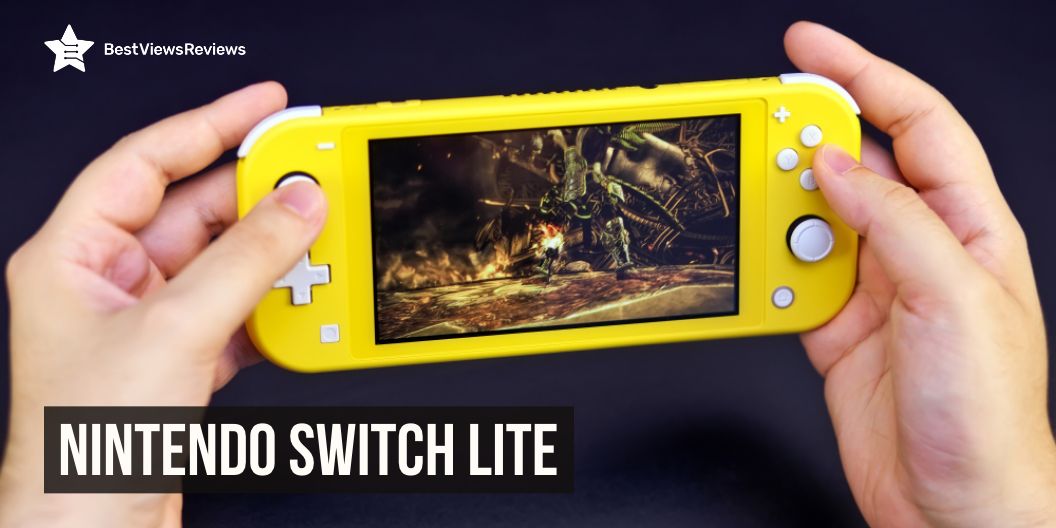
Nintendo switch lite

Nothing is better than experiencing the power of portability and the ultimate gaming experience at the same time. Nintendo Switch lite offers an array of games and features that keep you entertained.

It is a more compact version of the original Nintendo Switch console and is mainly designed for handheld gaming. The Switch Lite features a 5.5-inch LCD touchscreen, 32GB internal storage, and a battery life of up to seven hours. It is also compatible with all of the Switch’s existing games that allow you to play digital games anywhere. The Switch Lite is available in a variety of colors like turquoise, coral, black, yellow, and more that give you the opportunity to customize it to your own style.

How to put games on your Nintendo Switch Lite?

1. Purchase the game you want to play on your Switch Lite. You can purchase physical games in stores or digitally through the Nintendo eShop.

2. Insert the game cartridge into the top of the Switch Lite console if you purchased a physical copy.

3. Press the power button on the top of the console to turn it on.

4. Select the game you want to play from the home menu.

5. If you purchased a digital game, you can select the game from the eShop on the home menu. Enter your Nintendo account information.

6. Download the game, then select it from the home menu to begin playing.

Which is better Nintendo Switch vs Nintendo Switch Lite vs Nintendo Switch OLed

The best Nintendo Switch for you depends on your needs. The Nintendo Switch is the original console and has the most features, including the ability to connect to a TV and play with others. Whereas the Nintendo Switch Lite is a smaller and more portable version of the console, and it only plays handheld games.

The Nintendo Switch OLed is a version of the Switch with a brighter and more vibrant OLED display and improved battery life. All three consoles offer a wide variety of exclusive games. The right choice for you comes down to what features you need and how much you’re willing to spend.

What makes Nintendo Switch Lite special

Price

At just $199.99, the Switch lite is significantly cheaper than the original Nintendo Switch, which costs $299.99. This makes Switch Lite a great choice for those who are looking for an affordable way to join the Switch family. The Switch Lite is also much lighter and more portable than the original Switch which makes it great for taking on trips.

Design

Nintendo has made some clever design choices. The Switch Lite features a smaller touchscreen and an integrated control pad, rather than the split Joy-Con controllers of the original Switch. This makes it more comfortable to hold and allows for more precise control. The Switch Lite has a matte finish that makes it more resistant to scratches and fingerprints. Its symmetrical design makes the console look sleek and stylish.

Controls

The console includes a set of controls that are easy to use and allow for a wide range of gaming experiences. The Joy-Con controllers can be detached and used as individual wireless controllers for a more traditional gaming experience.

The Nintendo Switch Lite features a special HD Rumble feature, which provides a realistic sensation of vibration. These intuitive controls provide you an enjoyable gaming experience.

Display

The 5.5-inch LCD screen offers a bright, vibrant display with excellent color accuracy and sharp clarity. The display also features touchscreen capabilities that allow players to interact with the game in a more direct and intuitive way.

Battery Life

The Switch Lite has a battery life of up to seven hours depending on the game, which is significantly longer than the original Nintendo Switch’s battery life of three to six hours. This makes the Switch Lite an ideal console for gaming on the go, as it offers enough battery life to last through several gaming sessions. This makes the Switch Lite perfect for long trips, camping, or any other time when you may not have access to a power source.

Can Nintendo Switch Lite play all Switch games?

No, the Nintendo Switch Lite is not able to play all Switch games. The Nintendo Switch Lite is a handheld-only console and is not compatible with games that require the use of a TV or a separate dock, such as games that require motion controllers or multiple players.

Can you connect a controller to a Nintendo Switch Lite?

Yes, the Nintendo Switch Lite does not have any ports for connecting a controller. But you can wirelessly connect a Joy-Con or Nintendo Switch Pro Controller.

Conclusion

The Nintendo Switch Lite is an excellent choice for gamers who are looking for an affordable, portable console. It provides a great gaming experience with its vibrant display and responsive controls. With its wide selection of games and portability, the Nintendo Switch Lite is sure to be a hit with gamers of all ages. If you want a more immersive experience then you can also check the best Nintendo Switch headsets.

BestViewsReviews helps you find the best Nintendo Switch consoles and top Nintendo Switch controllers on the market by rating and reviewing them on the basis of quality, convenience, and durability. Get unbiased, honest reviews of products before you buy.
The Best Budget Canister Vacuum Cleaners

Canister Vacuum Cleaners

Canister vacuum cleaners are one of the most popular and effective methods of keeping your home clean. They offer powerful suction, great maneuverability, and a wide range of attachments to help you reach difficult-to-access areas. Canister vacuum cleaners are lightweight and easy to move around, making them ideal for cleaning stairs, furniture, and other surfaces. These vacuums also come with a variety of attachments, such as brushes and crevice tools, to help you clean more efficiently.

Robot vacuum cleaners can also make home cleaning a quick job. Go through our blog to know about the pros and cons of robot vacuum cleaners.

What should I keep in mind when buying a vacuum cleaner?

When buying a vacuum cleaner, there are a few key things to keep in mind. First, consider the size and weight of the vacuum. You can choose from a variety of sizes vacuums come in depending on how much space you have and how often you plan to use them. You may want to opt for a smaller, more lightweight model if you want to move it around with ease in the house.

Second, think about the type of flooring you have. Different vacuums are designed for different surfaces, so it’s important to choose one that will work well on your floors.

Third, consider the attachments that come with the vacuum. Some models come with a wide range of accessories, from upholstery tools to crevice nozzles, so you can make sure you’re getting the most out of your vacuum.

Finally, it’s important to figure out what your budget is and what features are most important to you.

The most important feature of a vacuum cleaner is its suction power. This is what determines how well the vacuum can pick up dirt and debris, so it’s important to make sure you’re getting a model with enough suction to get the job done. Other important features to consider are the noise level, the filtration system, and the battery life (if you’re buying a cordless model).

How many times a week should you vacuum your house?

A lot of factors come into play when determining how often you should vacuum your house. It is usually recommended to vacuum your house at least once a week. Depending on the number of people living in the house and the amount of foot traffic, you may need to vacuum more often. If you have pets and they shed, you may need to vacuum even more frequently. Carpets should also be vacuumed more frequently than hardwood or tile floors.

The customer reviews of Bissell Zing Canister 2156A Vacuum claim that it features cyclonic action and powerful suction that provides thorough cleaning.

What is the proper care and maintenance of a vacuum cleaner?

Proper care and maintenance of a vacuum cleaner are important for keeping it in good working order and ensuring that it is able to effectively clean your home. Here are some tips for keeping your vacuum cleaner in top shape:

  • Empty the dust cup or bag regularly. Depending on the model, this should be done after each use or when it becomes full.
  • Clean the filter regularly. Most vacuum cleaners have a filter to help trap dust and dirt. Replace the filter as recommended in the owner’s manual.
  • Clean the brush roll. Hair and other debris can get twirled around the brush roll, reducing the suction power of the vacuum cleaner. Check the brush roll for debris and clean it as needed.
  • Clean or replace the belt. The belt is important for the vacuum’s suction power. Check it periodically for signs of wear or damage and replace it as needed.
  • Check the hoses and attachments. Vacuum hoses and attachments should be checked regularly for blockages or signs of wear. If necessary, clean or replace them as recommended.
  • Inspect the cord and plug. Check the cord and plug for any signs of wear or damage. If necessary, have them replaced.
  • Store the vacuum properly. When the vacuum is not in use, make sure to store it in a cool, dry place. Do not store it near heat sources or in direct sunlight.

Handheld vacuum cleaners are also convenient devices to clean your home. Read our blog on handheld vacuum cleaners to know more about them.

How do I know when my canister filter needs cleaning?

The frequency of cleaning your canister vacuum cleaner filter depends on how often you use your vacuum cleaner and the type of filter your vacuum cleaner has. Generally, you should clean your filter every 3-4 months or after every 10 hours of use.

How often should a vacuum be serviced?

It is recommended that a vacuum should be serviced at least once a year, or after every three to four uses. Servicing your vacuum regularly helps to ensure that it runs properly and optimally, and prevents major problems from arising. It is also important to check for any damaged or worn parts that may need to be replaced.

During servicing, the vacuum filters should be replaced, the roller brush should be cleaned or replaced, and the belts should be checked for wear. Finally, the bag or dust cup should be emptied and the vacuum should be thoroughly cleaned.

Miele Compact cleaner is also a great option available at a discount of up to $130 during the sale.

How do you clean a bagless canister vacuum?

  • Begin by emptying the dust canister of the bagless canister vacuum. To do this, open the dust canister and remove the lid. Set the lid aside and tip the canister over a trash can. Shake the canister to remove all the dirt and dust particles. Once the canister has been emptied, set it aside.
  • Use a vacuum cleaner attachment to remove any remaining dust and debris from the canister. Start at the top and work your way down to the bottom. Make sure to reach into all the nooks and crannies.
  • Clean the filter. This step is important because the filter will trap dust and dirt particles. Most bagless canister vacuums have a removable filter that can be washed in warm, soapy water.
  • Wipe down the outside of the canister with a damp cloth. This will remove any dust that may have accumulated on the outside.
  • Reassemble the canister vacuum. Replace the lid on the canister and place the filter back in its proper place. Your vacuum should now be clean and ready to use.

How can I make my vacuum cleaner more powerful?

  • Clean the filter and hose regularly: Vacuum cleaners tend to lose power over time due to dust and debris buildup. To keep your vacuum cleaner as powerful as possible, clean the filter and hose regularly. This will help to ensure that the suction power isn’t being reduced by a clogged filter or hose.
  • Change the vacuum bag: Vacuum bags can become clogged with dirt and dust over time, reducing the suction power of your vacuum cleaner. To keep your vacuum cleaner powerful, change the vacuum bag regularly to ensure that the suction power is not being reduced.

Can I use a canister vacuum on the carpet?

Yes, you can use a canister vacuum like Miele Grey Classic on the carpet, but it may not be the best option for deep cleaning. Canister vacuums are often used for cleaning hardwood floors, but they can be used on carpets as well. Canister vacuums are light and easy to maneuver, so they are great for quick clean-ups on carpets. They, however, don’t have the same suction power as an upright vacuum, so they are not ideal for deep cleaning carpets. Upright vacuums are designed for cleaning carpets, so they are better for deep cleaning.

We also have a detailed blog on the best handheld vacuum cleaner for carpet cleaning to make deep cleaning easier.

What is better a canister vacuum or an upright?

A canister vacuum like Kenmore 81214 200 is great for cleaning hard-to-reach places like stairs and corners, as it comes with a flexible hose and wand. Upright vacuums, on the other hand, are good for cleaning large areas quickly, such as carpets and bare floors, as they have a wider cleaning path.

Canister vacuum cleaners are often more lightweight and easier to maneuver around furniture and other obstacles. They also tend to have better suction power than upright vacuums. This makes them great for deep cleaning carpets and rugs.

Upright vacuums like Shark NV501 are great if you want to get the job done quickly. They have larger dust bins and offer more suction power than canister vacuums. These vacuums are also great for tackling pet hair, as many models that come with extra attachments are specifically designed for this purpose.

Conclusion

Canister vacuum cleaners are a great tool to help keep your home clean and tidy. They offer powerful suction and a variety of attachments to make cleaning easier and more efficient. The canister vacuum cleaners are also lightweight and maneuverable, making them easy to use and store.

Get the best reviews and ratings on a wide range of products. BestViewsReviews helps you make the right purchasing decision. Whether you’re looking for the top-rated bathroom canisters or the best canister vacuum cleaners, we’ve got you covered.

The Best Play Gyms For Infants And Toddlers

Play Gyms for Infants

Play gyms for infants are a great way to keep your child entertained and stimulated while they learn and grow. These gyms provide a safe and stimulating environment for young children to explore and play. They offer a variety of activities and materials to help babies and toddlers develop a variety of skills, including gross motor, fine motor, and cognitive skills.

Why is a play gym important for babies?

Play gyms are important for babies because they provide a safe and stimulating environment that encourages physical, cognitive, and social development. They provide a safe place for babies to explore, move around, and practice their coordination and fine motor skills. The toys, colors, and textures of the gym help to engage a baby’s senses, encouraging them to explore and develop new skills.

What are the benefits of a play gym?

A play gym like the Gupamiga Baby Folding mat is a great way to help your baby develop, exercise, and have fun. The benefits of play gyms include:

  • Strengthens Motor Skills: Playing with the play gym helps babies develop their motor skills. Babies can learn to move their hands and feet in order to reach and grab toys. They can also practice gross motor skills such as crawling, standing, and walking.
  • Promotes Socialization: The play gym provides an opportunity for babies to interact with other babies and adults. This helps them learn how to communicate and interact with others, as well as develop social skills.
  • Enhances Creativity: The play gym provides a safe environment for babies to explore and use their imagination. They can explore different toys and activities and create their own games and stories.

Fisher-Price gym’s reviews show that it is equipped with hanging activity toys and motion-activated music that encourages teeny-tiny ones to reach.

When Should baby use play gym?

Babies can begin to use a play gym as soon as they can hold their heads up on their own. This usually occurs around 3 or 4 months of age. Play gyms are designed to stimulate a baby’s senses and help them develop their physical and cognitive skills. They usually include bright colors, textures, and sounds to engage a baby. Gyms like Fisher-Price Deluxe Kick ‘n Play come with smart stages technology that makes the mat suitable for different age groups. Play gyms often come with attachable toys that a baby can grab and explore. They can also help a baby learn how to reach out and grab objects.

The customer reviews of Skip Hop Silver Lining Cloud Baby Play Mat claim that it’s made of high quality Non-toxic material that makes it safe to use.

How does a baby gym support physical development?


A baby gym like Lovevery Activity Gym & Play Mat is a great way to support physical development in infants and young children. It provides a safe, stimulating environment for them to explore and develop their motor skills. With the use of toys such as hanging mobiles, rattles, and other objects that can be manipulated, a baby gym helps babies to develop their gross motor skills, such as reaching, grasping, and pushing. As they get older, they can use the gym to practice their fine motor skills, such as grasping objects with their hands or manipulating buttons and levers.

What are some safety tips to keep in mind when using a play gym?

  • Always supervise your child while they are playing in a play gym like Infantino 4-in-1 Jumbo Baby Activity Gym. Make sure to stay within arms reach so you can quickly intervene if needed.
  • Inspect the play gym before allowing your child to play on it. Look for any signs of wear or tear that could potentially cause injury.
  • Make sure the gym is stable and securely fastened to the ground. This will help prevent it from tipping over.
  • Teach your child how to properly use the gym. Show them how to safely enter and exit the gym, how to correctly position their body, and how to use the equipment safely.

Conclusion

Play gyms for infants and toddlers are an important tool for early childhood development. They provide a safe and stimulating environment for young children to explore, learn, and develop. These gyms are also generally easy to set up and relatively inexpensive. Ultimately, play gyms for infants and toddlers are an excellent way to help young children learn and grow.

Get the best reviews and ratings on the products you’re interested in. BestViewsReviews helps you make the right purchasing decision. Whether you’re looking for the top-rated building toys or the best baby gyms, we’ve got you covered.

Smoke Cocktail Kits For a Unique, Smoky Twist

Smoke Cocktail Kits

Are you looking to add a hint of smokey deliciousness to any cocktail in minutes? The smoke cocktail kits are the perfect way to take your entertaining to the next level as these kits allow you to create your own signature drinks.

Smoke cocktail kits are specialized tools that use smoke to enhance a cocktail’s flavor and presentation. They include a vessel, such as a glass dome or carafe, that allows you to capture and infuse smoke into a spirit or beverage.

The smoke adds dimension and depth to the cocktail’s flavor and can also be used to create a dramatic presentation. Smoke cocktail kits are becoming increasingly popular amongst mixologists, with many restaurants and bars offering customized smoke infusions that reflect the flavors of their menus.

With the rise of craft cocktails, these kits provide a unique way to create an unforgettable drink. However, it is important to know about the smoking equipment you need to smoke your cocktails.

Smoke Cocktail Kits: Smoking Equipment For Your Cocktails

Smoked Cocktail Boards

Smoked Cocktail Boards are a revolutionary and innovative way of smoking cocktails. These boards are designed to provide a unique flavor to any cocktail, as well as an aesthetically pleasing presentation. The boards are made of high-quality, food-safe material, and come in a variety of shapes and sizes.

Wood shavings are placed on the board and then heated using the torch. This provides a unique experience for any cocktail, adding a depth of flavor and complexity that cannot be achieved with traditional methods. The Helius Originals Luxury Smoke Wood Boards are also great for entertaining, as they add a visual element that can be used to impress guests.

Rocks Glasses

Rocks glasses, also known as old-fashioned glasses, are essentially short tumblers that are used to serve cocktails and other beverages on the rocks. Their wide mouth allows for the addition of ice, making them an essential part of any barware collection. Thanks to their shape and design, they are ideal for serving drinks with a smoky finish, such as a classic old-fashioned or a whiskey sour.

The wide mouth also allows for more air contact with the smoke, intensifying the flavor and aroma of the cocktail. The low height of the top-quality glass also makes it easier to combine and stir the ingredients, creating a more balanced and enjoyable smoked cocktail.

Wood Shavings

Wood shavings are a type of wood chip that is most commonly used to smoke cocktails. In order to enjoy a smoked cocktail, one must first prepare the wood shavings. The wood shavings are placed in a metal container or wood board that is heated to create smoke. The container is filled with either hardwood chips or sawdust and then heated over an open flame.

Once the Helius Originals Luxury Smoker Wood Shavings are producing smoke, they can be used to flavor and infuse the drink. Wood shavings can come in various flavors like black walnut, cherry, sugar maple, and white oak. With the right blend of wood shavings, one can create a unique and flavorful drink.

Torch in Smoke Cocktail Kits

A torch is a tool that is equipped with a blowtorch and a smoke wand. The blowtorch is used to heat up the smoke wand, which is then inserted into the glass of the cocktail. Once the wand is in the glass, the smoke is released, giving the cocktail a unique smoky flavor. A torch is also used to ignite wood shavings placed in a cocktail chimney or cocktail boards.

Cocktail Chimney

Cocktail chimneys are an essential tool for enjoying smoked cocktails. They are specialized glass or wood containers that allow for the smoke from flavored wood chips to flavor drinks. A base spirit is poured into the chimney and then a lid is placed over the top.

Charcoal and flavored wood chips are placed in a separate chamber at the bottom of the chimney. The smoke from the flavored chips is then released from the top of the chimney and diffuses the flavor into the spirit. The combination of smoke and spirit creates a unique and delicious cocktail.

How to Smoke Cocktails?

Using Smoke Topper and Cocktail Chimney

To smoke a cocktail using a smoke topper and a cocktail chimney, follow these steps:

1. Start by preparing the drink in the rock glass as usual.

2. Take the smoke topper, place it securely over the top of the glass, and fill it with your choice of smoking material.

3. Check the tightness of the seal, and ensure the glass opening is completely covered.

4. Light the smoking material with a torch, match, lighter, or other appropriate flame sources.

5. Allow the smoke to fill the cocktail

Using Smoked Cocktail Boards

Smoking cocktails with a smoked cocktail board can be a great way to add an extra layer of flavor and aroma to your favorite drinks. Here are some simple steps to get you started:

1. Start by gathering the necessary supplies, including a smoked cocktail board, a few pieces of wood chips, matches, a lighter, as well as your favorite cocktail ingredients.

2. Place a few pieces of wood chips onto the smoked cocktail board.

3. Light the chips to create the smoke.

4. Make sure to keep the flame away from the board to avoid melting it.

5. Place the glass over the top of the board and let the smoke permeate for about 15-20 seconds.

6. Take the glass off and prepare your drink

Types of Woods Available and Their Impacts on the Cocktail Flavor 

White American Oak

White American Oak is a type of oak wood used for aging and flavoring spirits as well as other beverages. Its impact on cocktail flavor can range from subtle vanilla and coconut notes to more intense spice and smoky flavors. White American Oak can also impart a touch of sweetness and a roundness of flavor.

Sessile European Oak

The Sessile European Oak is a type of oak tree found in Europe, noted for its strong and flavorful wood. The wood is often used in the making of barrels for aging and storing spirits, giving a unique and intense flavor to the cocktail. The oak imparts a sweet and spicy flavor, with notes of vanilla, caramel, and honey, along with a subtle smokiness.

Penduncate European Oak

The Pendunculate European Oak is a species of an oak tree that produces a distinctive woody flavor that is said to be mellower and less tannic than other oaks. Its unique flavor profile has been used to great effect in cocktails, adding a smooth, woody, and slightly smoky flavor to drinks. Pedunculate European Oak compliments earthy flavors like whisky and rum, as well as citrus-based drinks like martinis and margaritas.

Japanese Miunara Oak

Miunara Oak is an oak wood species native to Japan that has seen an increase in popularity for use in the creation of cocktails. The wood adds an earthy, smoky flavor when used to age spirits and makes for an excellent aging vessel. Furthermore, the wood is known to impart a unique umami-like flavor to spirits. Its influence on the flavor profile of a finished cocktail is hard to ignore, as the unique characteristics of this type of oak can bring out flavors that would otherwise be undetectable.

Garry American Oak

Garry American oak imparts a spicy, bold flavor to the cocktails, combined with a hint of sweetness, smokiness, and notes of coffee and clove. The flavor is enhanced by the oak’s tight grain pattern, which helps to mellow the tannins of the wood and create a smooth, complex flavor. Garry American oak has become a popular choice for craft cocktail makers, due to its unique flavor profile and ability to infuse unique nuances of flavor into drinks.

Conclusion

Incorporating a smoke cocktail kit into your home bar can be a great way to create unique and delightful drinks. Not only will this provide you with a great way to entertain guests, but it can also help you to create truly unique flavors. With the use of smoke, you can give traditional cocktails a completely different and unique taste. Make sure you get the right tools, so, you can make your home bar the ultimate place for friends and family to gather.

BestViewsReviews is your one-stop shop for all the information you need to make an informed decision. Get the best reviews and ratings on the best outdoor smokers and cocktail shakers you’re interested in before you buy!

7 Best Energy Drinks To Boost Your Energy Levels

best energy drink

Energy drinks have become incredibly popular among people who want to get an energy boost, improve their focus, and increase their stamina. The best energy drink provides an effective blend of ingredients. They contain high levels of caffeine and other stimulants, such as taurine, guarana, and B vitamins, to give you the energy you need to get through the day. Not only do they give you an energy boost, but they can also help increase mental alertness. The best energy drinks will also contain less sugar and fewer calories than traditional energy drinks.

7 Best Energy Drinks

3d energy drink

3D Energy Drink’s reviews claim that it provides a refreshing boost of energy with a unique smooth, clean flavor. It offers 200mg of caffeine and only 15 calories. It is for those who want to reach greater heights, expand their horizons, and tap into their element. This will help provide you with the energy you need with a taste you’ll love.

Celsius energy drink

Celsius drink comes with a juicy and citrusy sweet blend of refreshing oranges. This drink has a wonderful spicy flavor, and it’s known to help support the process of thermogenesis. It is packed with 7 essential vitamins, contains zero sugar, no artificial colors, no aspartame, and no high fructose corn syrup. It is available in a variety of both sparkling and non-carbonated flavors.

Alani nu energy drink

Alani nu drink contains 200mg of caffeine that helps in boosting energy for a busy day. This drink comes with zero sugar which helps in maintaining body weight. This carbonated drink also enhances brain functioning. It is a lightly carbonated drink for a smoother, more refreshing drinking experience. This drink is packed with all the nutrients you need and none of the fillers you don’t.

Zoa energy drink

ZOA Energy Drink provides healthy energy for balance and drive and includes a unique vitamin c, b vitamin, and electrolyte mix. It supports immunity, focus, and energy for sports. This drink is formulated with caffeine from green tea and green coffee beans which provides balanced natural energy without the crash. It helps you stay balanced and focused on your goals.

Monster energy drink

The customer reviews of the Monster energy drink show that it comes with a great coffee flavor. It comes with 200mg of caffeine per can. Its Kona beans combined with a premium imported coffee blend make for an unbeatable combination. This 12-pack energy drink is also available at a discount of $5.

Nos energy drink

Nos energy drink comes with an outstanding flavor. The energy kick of this drink is balanced and long-lasting. This drink also gives you energy and keeps you focused during long hours of work. It comes with low sodium and no artificial flavors.

V8 energy drink

V8 energy drink is powered by black and green tea to deliver roughly the same amount of caffeine as a cup of coffee. It is a great plant-based energy drink. This is a lightly carbonated energy drink for a refreshing, crisp taste. It’s also free of artificial colors and added sugars. The drink contains one combined serving of fruits and vegetables for an energy drink you can feel good about.

What energy drink has the most caffeine?

The drink with the highest caffeine content is ‘Bang Energy’. It contains a whopping 300 milligrams of caffeine per 16-ounce can. This is significantly more than most other energy drinks on the market. Other popular energy drinks, such as Monster and Red Bull, contain about half the amount of caffeine (160 milligrams per 16-ounce can).

Pros of Energy Drink

A boost in energy

Energy drinks can provide a quick boost of energy by providing a combination of caffeine, vitamins, and other natural stimulants. This can help the user stay more focused as well as productive throughout the day.

Improves your mood and attitude

Energy drinks can also help to improve mood and attitude. Caffeine, as well as other natural stimulants, can help to boost energy levels and help the user to stay motivated and focused.

Convenient

Energy drinks are readily available and convenient to carry around. They are easily found in most convenience stores and grocery stores, making them a great source of quick energy when needed.

Boosts performance of Workout

Energy drinks boost athletic performance as well as help athletes reach their peak performance. The caffeine and other ingredients found in these drinks can help boost physical endurance and mental alertness, allowing athletes to work out longer and harder.

Cons of Energy Drinks

Cardiovascular problems

High levels of caffeine and other stimulants found in energy drinks can cause a spike in blood pressure and heart rate, increasing the risk of heart attack or stroke. Research has shown that these drinks can also cause irregular heartbeats and cardiac arrhythmia, especially in people who are sensitive to caffeine or have underlying cardiovascular problems.

Weight gain

Energy drinks are high in sugar and calories and can contribute to weight gain. Some energy drinks also contain artificial sweeteners, which may increase cravings for sweetened drinks and snacks.

Addictive

Energy drinks contain large amounts of caffeine and other stimulants, which can make them addictive. Regular consumption of energy drinks can lead to tolerance and dependence, as well as withdrawal symptoms such as headaches and fatigue when the drinks are stopped. Some people may also become psychologically dependent on these drinks, using them to cope with stress or as a pick-me-up.

How long does an energy drink last?

The answer to this question depends on a few factors. First, it depends on how much of the energy drink is consumed. A single can of this drink typically lasts about 4 to 6 hours. However, if a person consumes several cans, the effects may last a few hours longer.

Second, it depends on the individual’s metabolism. Different people metabolize the ingredients in these drinks differently, so the effects may last longer or shorter periods of time depending on the individual.

Finally, it depends on the type of drink consumed. Some energy drinks contain more caffeine or other stimulants than others, so their effects may last longer.

Overall, the effects of this drink typically last between 4 and 6 hours, although this can vary depending on the individual and the type of drink consumed.

Can 1 energy drink a day harm you?


Yes, drinking one energy drink a day can be harmful to your health. These drinks contain stimulants like caffeine and taurine, which can increase heart rate, and blood pressure and cause anxiety. Regular consumption of energy drinks can lead to insomnia, dehydration, and an increased risk of heart problems. Energy drinks also contain high levels of sugar, which can lead to weight gain and an increase in cavities.

Conclusion

Energy drinks are convenient and can provide a quick boost of energy. It is however important to be aware of the potential risks of consuming too much caffeine or other added ingredients. Different drinks offer a variety of flavors, ingredients, and levels of caffeine, so it’s important to do some research and find the one that works best for you. Experiment with different drinks to find the one that will give you the most energy and help you feel energized throughout the day.

Get the best reviews and ratings on the products you’re interested in. BestViewsReviews helps you make the right purchasing decision. Whether you’re looking for the top-rated energy drinks or the best protein drinks, we’ve got you covered.